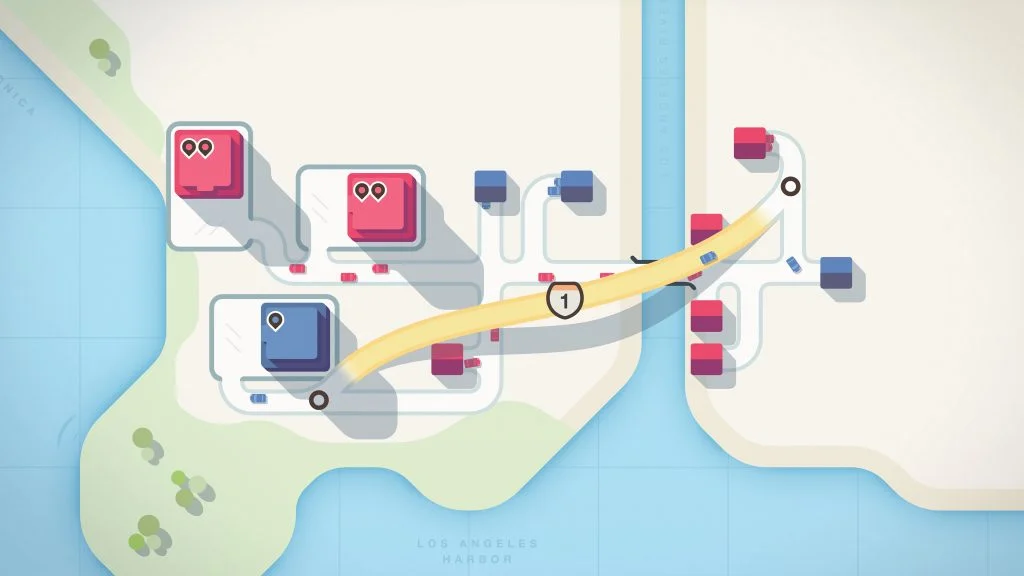
To fix traffic jams in Mini Motorways, follow a delayed car from its neighbourhood toward its destination. Look for where it actually loses time before adding another road. A long journey and a busy junction need different responses.
Dinosaur Polo Club’s official game page describes drawing and redesigning roads as a city grows. This guide offers a practical review process for those changes. It does not promise a permanent layout: new buildings and changing demand will give you new problems.
Trace one complete journey
Choose a destination that is struggling and inspect the roads feeding it. Then follow one of the relevant neighbourhoods back through the network. A junction can look busy without being the part that limits this particular journey.
I recommend making one change for one stated reason. “This connection shortens the route to that destination” is testable. “More roads should help” is too vague to evaluate. If several destinations are in immediate trouble, address the most urgent one and then check what your change did to the others.
| What you see | What to investigate | Possible response |
|---|---|---|
| A long indirect journey | Whether a shorter connection is available | Compare a direct route with your current detour |
| Cars queue at an intersection | Which journeys share that junction | Reduce unnecessary crossing traffic |
| A new destination is poorly served | Which matching neighbourhood can reach it | Connect supply deliberately before expanding elsewhere |
| A road change creates another queue | What traffic now uses the altered connection | Review the trade-off before adding more complexity |
| An upgrade seems tempting | What current problem it would solve | Choose it for a visible need |
Give a motorway a specific job

A motorway should connect places for a reason. Before placing one, identify the trips you expect it to improve and inspect the roads at both ends. Moving cars quickly across the map is less helpful if they immediately join a congested local approach.
For an illustrative practice case, imagine two neighbourhoods feeding destinations across a river through one busy junction. A new connection may separate those journeys. But if the bottleneck is at the destination entrance, shortening the river crossing alone may leave the main problem unresolved. Watch the result rather than assuming the expensive-looking upgrade solved it.
A five-step traffic review
- Choose a destination. Identify the place whose service you want to improve.
- Trace its connections. Follow the relevant roads and note where different journeys meet.
- Name the delay. Distinguish distance, crossing traffic and a difficult approach.
- Make a limited change. Use the roads or upgrades available in your selected mode.
- Watch the next journeys. Check both the target destination and any neighbours affected by the edit.
Keep the map readable enough to repeat this process. A visually tidy grid is optional; understanding where the traffic goes is the useful part.
Choose junction tools for the junction

The official press kit lists upgrades including roundabouts and motorways. Read the offered choices and relate them to the actual map. A roundabout is not a reason to funnel unrelated traffic through one place, and a new motorway does not remove the need to connect its ends thoughtfully.
My preference is to keep unnecessary through traffic away from a local connection that already has a clear job. That preference changes when a shared route solves a real shortage of roads or crossings. Treat separation as a decision to justify, not a rule that forbids every shared segment.
Practise without chasing a universal blueprint
The developer now offers Creative Mode, alongside the game’s other ways to play. Use the current mode description to decide whether you want an open-ended design session or the pressure of a growing city. Instructions about available editing tools should match the mode you selected.
After a session, keep one observation for the next attempt: which connection helped, and what it cost elsewhere. Our Mini Metro overcrowding guide applies a similar diagnosis to train queues. Mini Motorways is listed for Apple Arcade, Steam and Nintendo Switch on its official page. Screenshots come from the developer’s press kit; older promotional interfaces may differ from your version.
Official promotional screenshot. Copyright remains with the developer.


No comments:
Post a Comment