
Vampire Survivors supports local co-op for up to four players. Before your first group run, sort out who controls each survivor and how you will spot one another on screen. The official Steam listing confirms local co-op and support for keyboard, mouse, controller and touch input.
Set up keyboard and controller players
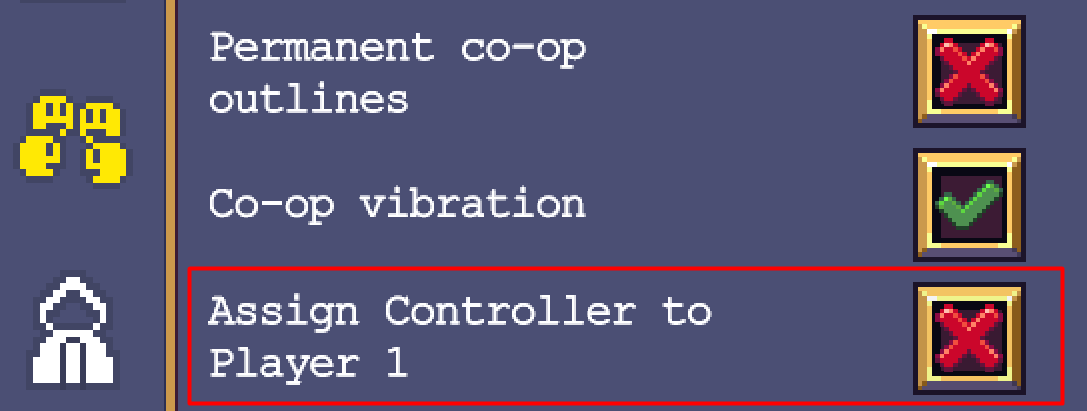
On PC, one person can use the keyboard and another a controller. In Options, uncheck “Assign Controller to Player 1” to give the controller to Player 2. Each player needs a separate input device; two people cannot share one keyboard. These are the instructions in poncle’s local co-op FAQ.
Connect the devices before choosing characters. Ask each person to press a direction while everyone else leaves their controls alone. If the wrong selection moves, fix the assignment before starting. Then repeat the test with all players present. A controller working in a two-person setup does not prove that your complete group is assigned correctly.
If a pad produces no input at all, use our PC gamepad troubleshooting checklist to separate a connection problem from a game setting. Change one setting at a time and test again, so you know which change helped.
Check the co-op settings together
The local co-op options include player outlines and cursor colours, permanent outlines, coloured selection arrows, and an option to take turns on treasure chests. Each survivor can only be selected once per run. See the developer’s control and character rules.
| Check | What to do together | Ready? |
|---|---|---|
| Player assignment | Test one device at a time, then the full group. | Yes / fix |
| Survivors | Agree who gets a shared favourite before selection. | Yes / fix |
| Visibility | Try outlines; confirm everyone can locate their survivor from their seat. | Yes / fix |
| Treasure chests | Agree whether to enable the turn-taking option. | Yes / fix |
| Run purpose | Pick a familiar stage or a specific unlock to work towards. | Written down |
| Stopping point | Agree whether you have time for one attempt or several. | Agreed |
Keep the answers on paper if you expect to play together again. Record the player count and input devices beside them. When someone brings a different controller next time, you will have a useful starting point for the setup check.
If the controller moves the wrong player
- For one keyboard player and one controller player, turn off Assign Controller to Player 1, as shown above.
- Ask the keyboard player to move while the other player leaves their controller alone. Then reverse the test.
- If both devices now control the intended characters, keep that assignment. If the controller is not detected at all, check its connection before changing unrelated gameplay settings.
I would test with two players first, then add the remaining devices one at a time. It makes a wrong assignment easier to trace. Give each player a different outline colour and check visibility during a crowded scene, not only on the selection screen.
For a remote session, use poncle’s online co-op rules: each player needs their own device and copy, and everyone needs the relevant DLC to use that DLC together. Local and online players cannot be combined in one session. Keep this distinction in the invitation so a friend does not arrive expecting to join from a second controller on your console.
Make the first attempt easy to discuss
Choose a small learning goal, such as keeping track of your survivor throughout a crowded encounter. Ask someone who knows the game to explain unfamiliar choices when they appear. Avoid turning every selection into a lengthy argument about an ideal build.
For early weapon choices, poncle’s starting tips on Steam recommend taking a few offensive weapons and concentrating upgrades on one at a time. Use that as a starting approach, then discuss what felt useful after the run. There is no need to agree on a complete loadout before anyone has played.
A defeated local player gets a coffin with a revival countdown; enemies staying on the coffin can interfere. More players also mean fewer weapon slots per person. Both rules are documented in poncle’s local FAQ. Tell new players about the coffin before the first defeat so they know what they are waiting for.
Use a separate plan for online friends
Native online co-op and couch co-op are separate modes. You cannot combine them in one session: every online player needs their own device and game copy. The current online FAQ also explains platform compatibility and DLC ownership. Check it before arranging a remote session; the older local FAQ still contains an outdated statement that official online play is unavailable.
After your local attempt, write down the setting that caused the most confusion and one change for the next run. Keep your control notes with our broader local co-op preparation checklist if you rotate between games.


No comments:
Post a Comment